> For the complete documentation index, see [llms.txt](https://docs.zetrix.com/en/llms.txt). Markdown versions of documentation pages are available by appending `.md` to page URLs; this page is available as [Markdown](https://docs.zetrix.com/en/developer-resources/multisig-dapp/joint-account-management/import-joint-account.md).
# Import Joint Account
### Purpose
This feature enables users to access and manage a multisignature (multisig) account that was originally created by another user or organization. Instead of requiring every signer to recreate the wallet manually, authorized users can simply import the account into their own interface and immediately begin participating in approval workflows.
Once imported, the user gains the ability to:
* View account balances and configurations
* Review pending proposals and transactions
* Approve, reject, or execute actions (depending on permissions)
* Monitor completed transaction history
* Participate in governance changes
This function ensures continuity of control, allows decentralized participation, and eliminates dependency on a single account creator or administrator.
### When To Use
* Someone added you as a signer previously.
If someone else created a multisig account and included your wallet address as one of the authorized signers, you can import that account to:
* View the account within your dashboard
* Participate fully in approvals
* Take responsibility as assigned signer
This is commonly needed in corporate teams, committees, or shared project groups.
* Organization already created the wallet.
For enterprise environments, the multisig wallet is often created centrally by:
* System administrators
* Finance controllers
* Project leads
* DAO / governance teams
Team members simply import the account to:
* Share responsibility
* Approve transactions
* Enforce governance rules
* Maintain accountability
This prevents unauthorized recreation or confusion with multiple duplicate wallets.
* You are replacing a device.
Importing is useful when:
* Changing laptops or desktops
* Installing a new browser
* Resetting wallet applications
* Moving to a new mobile device
Instead of rebuilding or reconfiguring everything, import makes recovery seamless while maintaining all historical ownership structure and permissions.
### Requirements
* You are an authorized signer.
Your wallet address must already exist in the account’s signer list.\
If you are NOT a registered signer:
* Import will fail
* You will not gain access
* You cannot view approvals or internal data
This prevents unauthorized users from gaining visibility or control over secured shared accounts.
* You know the joint account details.
To successfully import, you must know the correct:
* Joint account identifier
* Contract / account address
* Any reference metadata requested by the system
This ensures:
* Accuracy
* Security
* Correct account retrieval
Without correct information, the DApp cannot link you to the correct multisig wallet.
### Result
* Account becomes visible in dashboard.
After successful import:
* The account will be listed together with your other joint accounts
* You can easily select it at any time
* All interface features become available
This integrates the account naturally into your daily workflow.
* Pending tasks become accessible
Immediately after import, you will be able to:
* View and Participate in Governance
* Monitor Operations
* Maintain Security Awareness
This feature empowers signers to fulfill their roles efficiently and responsibly, ensuring that every multisig account remains securely and collaboratively managed.
### Flow
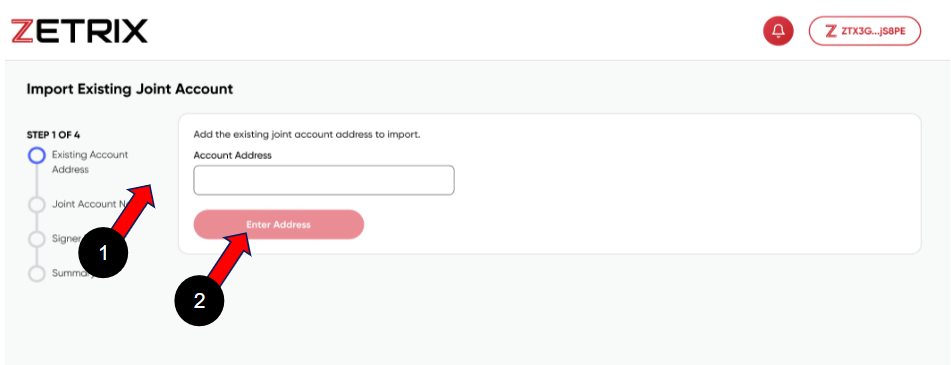
1️⃣ **Open Import Join Account and enter existing address to import.**
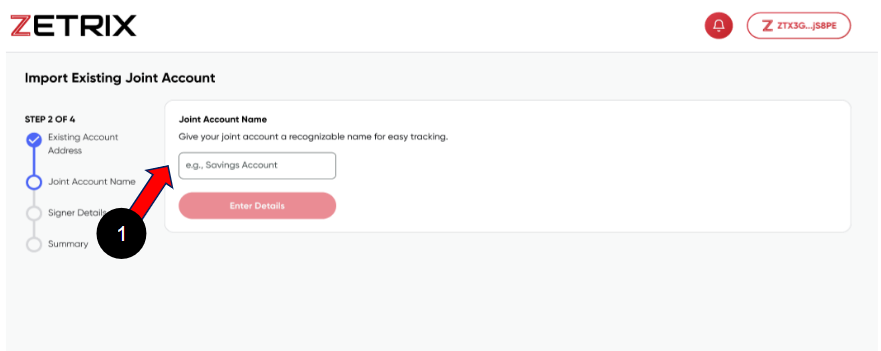
2️⃣**Fill up Joint Account Name**
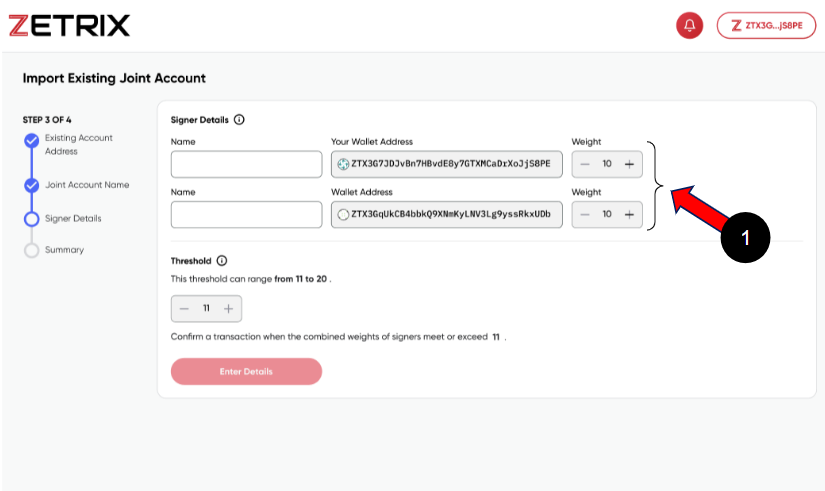
3️⃣**Enter new signer details.**
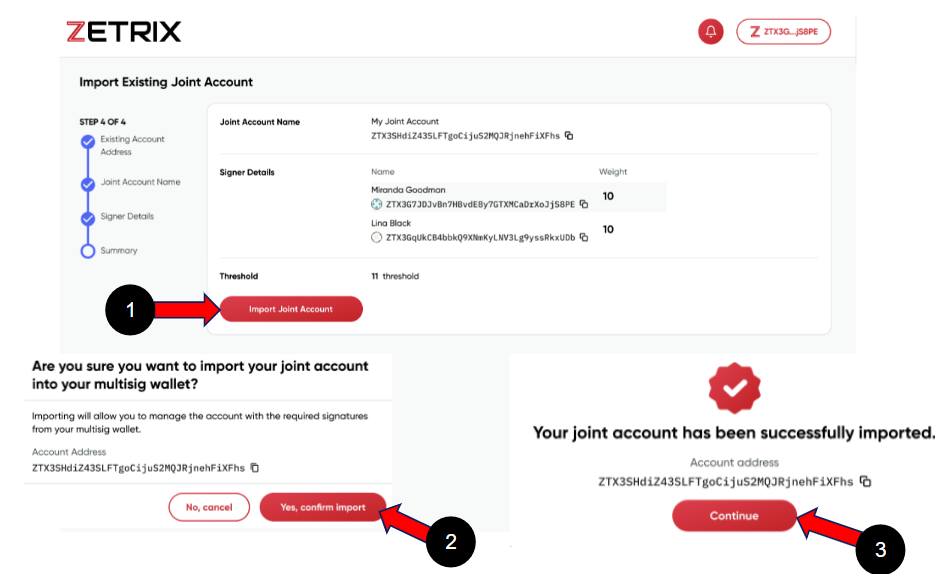
4️⃣**Confirm and submit.**